 Pet Store Tycoon
Order goods in the Stock menu
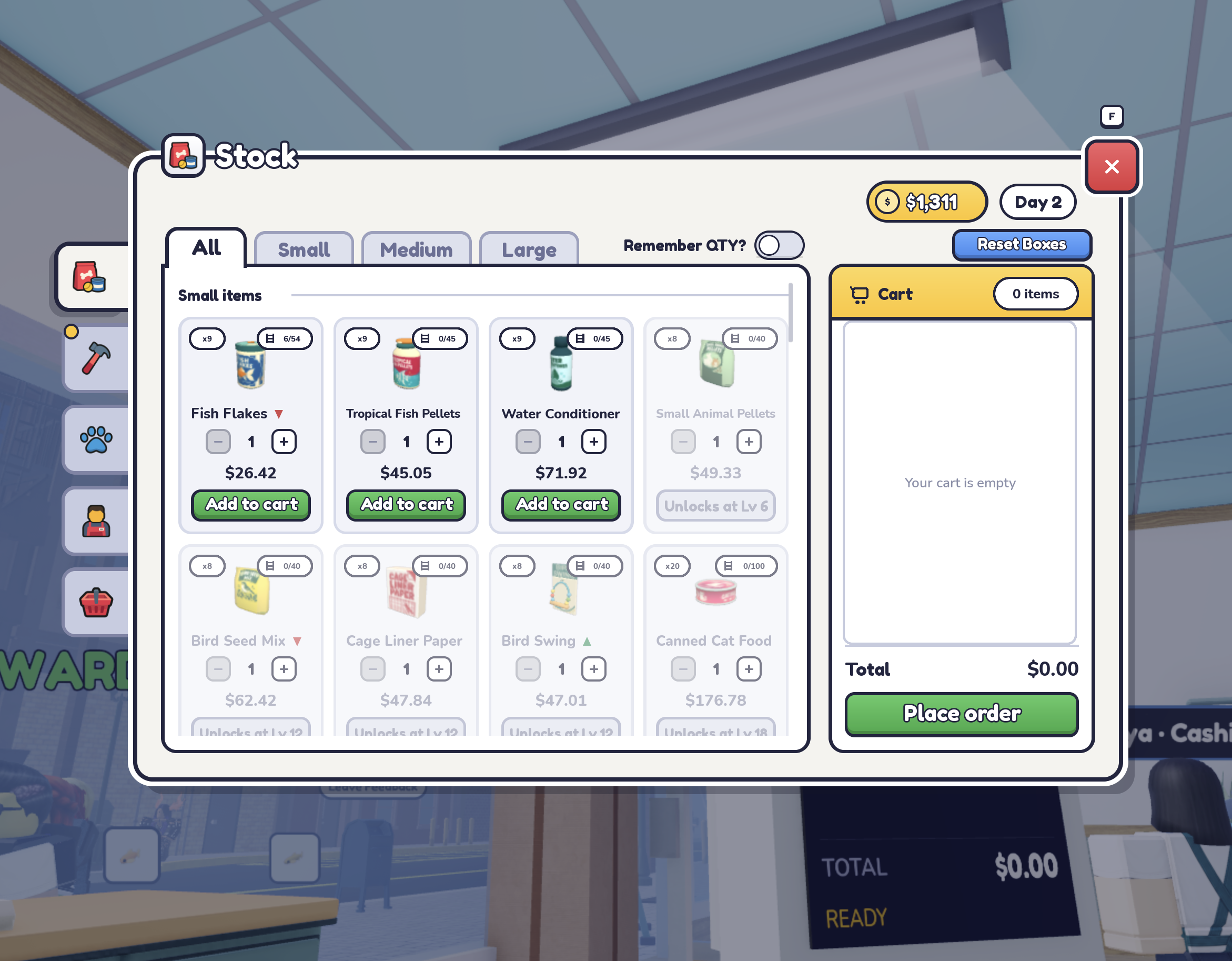
Open Stock with its goods icon (F on desktop). It orders goods for your shelves, not animals.
- Pick a product. Tabs: All, Small, Medium and Large.
- Set the quantity and select Add to cart.
- Check the Cart total, then select Place order.
Gameplay screenshots · Game art: Already Arrived Studios / Roblox ↗
Read the order before spending
Each card shows a price and pack label; our capture showed Fish Flakes at $26.42 with an x9 label. Prices can change, so read the current quote. A greyed-out item shows its level requirement, for example Small Animal Pellets: Unlocks at Lv 6.
Collect boxes and restock shelves
- Find the boxes on the pavement outside the store entrance.
- Carry a box to a matching shelf or rack. You can carry one box at a time.
- Use the shelf prompt to fill it, then check the goods appear.
- If it will not place, check the product’s size and free space on the fixture.
Ordering and stocking are different staff jobs
No worker is described as speeding up deliveries.
| Worker | Does | Not shown to |
|---|---|---|
| Stocker | Keeps shelves stocked | Buy stock |
| Inventory Manager | Orders a box when a shelf slot sells out | Put goods on shelves |
| Curbside Runner | Packs and delivers customer curbside orders | Speed up your incoming stock |
Delivery is fast; carrying takes the time
In our recording, boxes were already outside when the Stock menu closed. The slow part is carrying: one box per trip, so three products meant three trips. Keep the path from the entrance to your shelves clear.
Check which stage has stopped
| What you see | What to check |
|---|---|
| Goods still in the cart | Select Place order, not only Add to cart |
| Order placed, no box | Close Stock and look on the pavement outside the entrance |
| Box arrived, shelf still empty | Check the product fits the display and use the shelf prompt |
| A worker is stuck | Note its role, box and location; no universal fix is known |
Common questions
Where does purchased stock arrive?
On the pavement outside your store entrance.
Does Inventory Manager put stock on shelves?
Its documented job is ordering replacement stock. Stocker is the role described as keeping shelves stocked.
Does Curbside Runner speed up incoming deliveries?
Its description covers outgoing customer curbside orders. We have no evidence that it speeds up incoming stock shipments.
Sources & review notes
Official game description
Third-party procedure, reviewed October 10, 2026; collection and shelf placement not independently tested
Official public catalogue; prices and descriptions observed 2026-10-10T09:52:13.951138+00:00; purchase-screen price takes precedence
How we checked this page
Reviewed October 10, 2026 for Already Arrived Studios, Place 118845698633260. The player’s Day 2 screenshot documents Stock controls and sample prices. A separate 52-second player recording shows orders for Fish Flakes and Tropical Fish Pellets, boxes outside the entrance, pickup and shelf placement. Boxes were available when the menu closed; exact spawn latency and behavior across other sessions were not measured. Staff roles come from player-supplied Staff screenshots and the official pass catalogue. Reset Boxes behavior and delivery-speed upgrades remain unverified. In a subsequent October 10 report, the player identified repeated one-box carrying trips as the slow step; this is player-reported behavior, not a measured carrying-capacity or automation comparison. Remember QTY and Reset Boxes are visible controls but were not tested; Reset Boxes is not established as a delivery-speed button. One-box carrying is player-reported for the tested session; no way to carry several boxes was found. Stocker pickup behavior and delivery timing across sessions were not measured. The Staff card says Inventory Manager reorders stock and pet packs; pet-pack reorder triggers are untested.
This page covers the Already Arrived Studios game unless a section explicitly identifies the legacy experience. Check your version ↗