 Pet Store Tycoon
Step 1: Check you are in the right game
This guide is for Pet Store Tycoon by Already Arrived Studios (Place ID 118845698633260). An older DantesDivine game has the same name; its Vet, Food Store and Premium guides do not apply here. Check your version if a video shows different menus.
Step 2: Redeem PETS, SNEK and WHALE
PETS and SNEK each gave a Deluxe Pet Pack in player tests on October 10, 2026. The official FAQ also lists $500 with PETS and 30 minutes of cashier help with SNEK. WHALE was confirmed working on October 11; its reward is not yet confirmed. Each code works once per account.
- Click the phone icon on the left of the screen, or press C on desktop, to open Phone.
- Choose the Codes tile.
- Type one code and press the green REDEEM button. Repeat for the other codes.
Step 3: Get your first fish
Follow the tutorial at the highlighted starting tank. Published walkthroughs describe buying the Fish Pack there, opening it and choosing Keep. The Fish Pet Pack costs $100 in game cash on the October 10 catalogue screen. The Deluxe Pet Packs from Step 2 are free extra pets.
Step 4: Order stock and fill your shelves
Stock orders merchandise for your shelves, not animals. In the recorded session the boxes were already outside when the menu closed, but the player could only carry one box at a time, so plan several trips.
- Open Stock with its goods icon (F on desktop).
- Choose a product, set the quantity and select Add to cart.
- Check the Cart total, then select Place order.
- Pick up the boxes on the pavement outside the store entrance.
- Carry each box to a matching shelf or rack and use the shelf prompt to fill it.
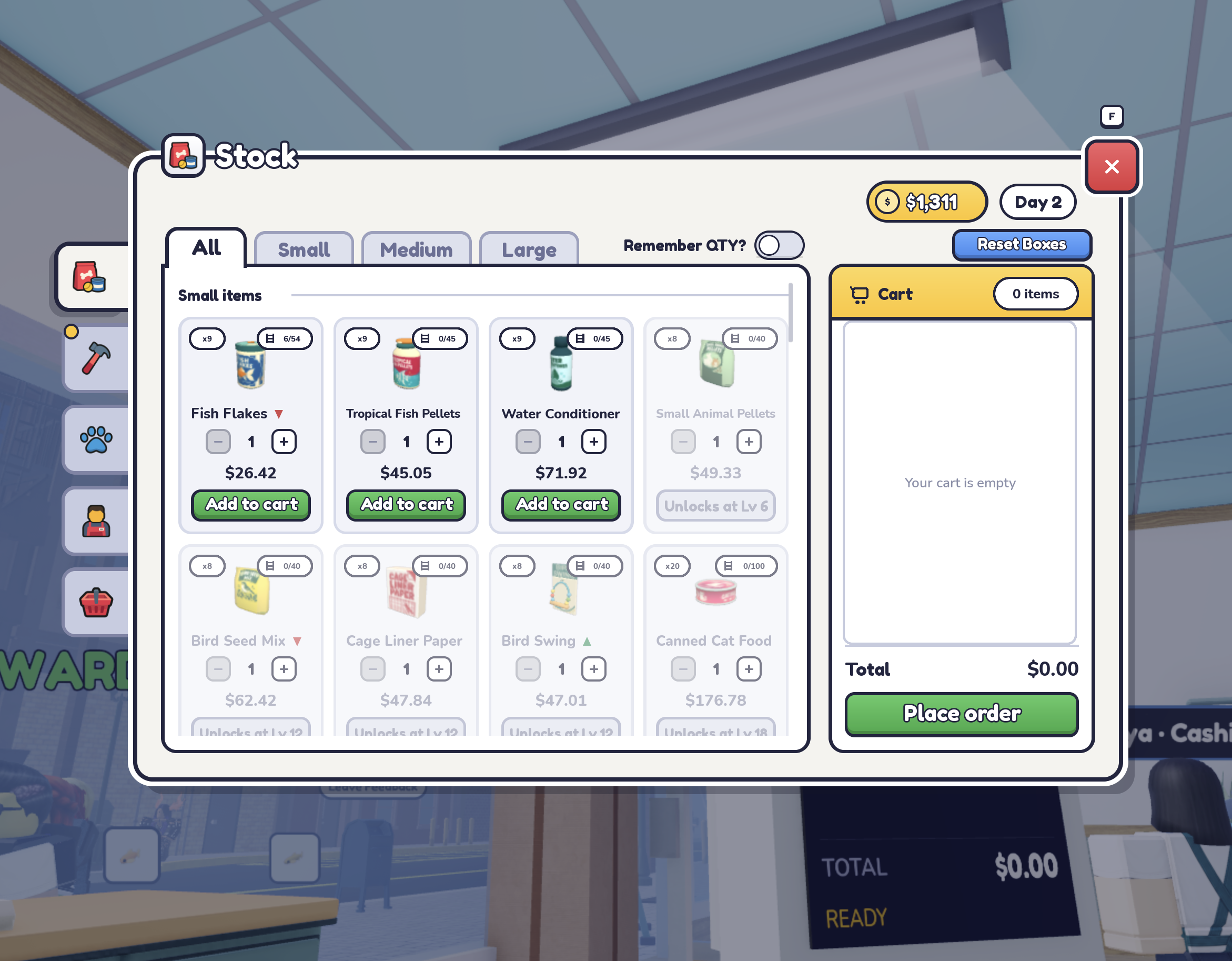
Gameplay screenshots · Game art: Already Arrived Studios / Roblox ↗
Step 5: Serve customers and care for pets
Customers pay at the register. A temporary starter cashier helps when you begin; the official FAQ does not say how long it lasts. Without that help, you serve customers at the register yourself until you get the Day 7 Self-Checkout or hire a cashier.
To bring in more shoppers, take pamphlets from the stand and give one to a passerby. Pamphlets only work while your store is open.
Between customers, use each enclosure’s care prompts. The developer lists feeding, cleaning and play. Our recommendation: deal with waiting customers and empty shelves first, and leave decorating for a quiet moment.
Step 6: Claim daily rewards for a free Self-Checkout
Open Daily Check-in and claim the available reward each day you play. Day 7 is a free Self-Checkout that serves customers on its own. The official FAQ says you need 7 real-life login days, not consecutive ones, and the machine arrives in a box outside your store.
Daily rewards also give Golden Tickets. Hold a ticket and aim at a shelf to make it a golden shelf that sells for 2x; it stays golden when upgraded.
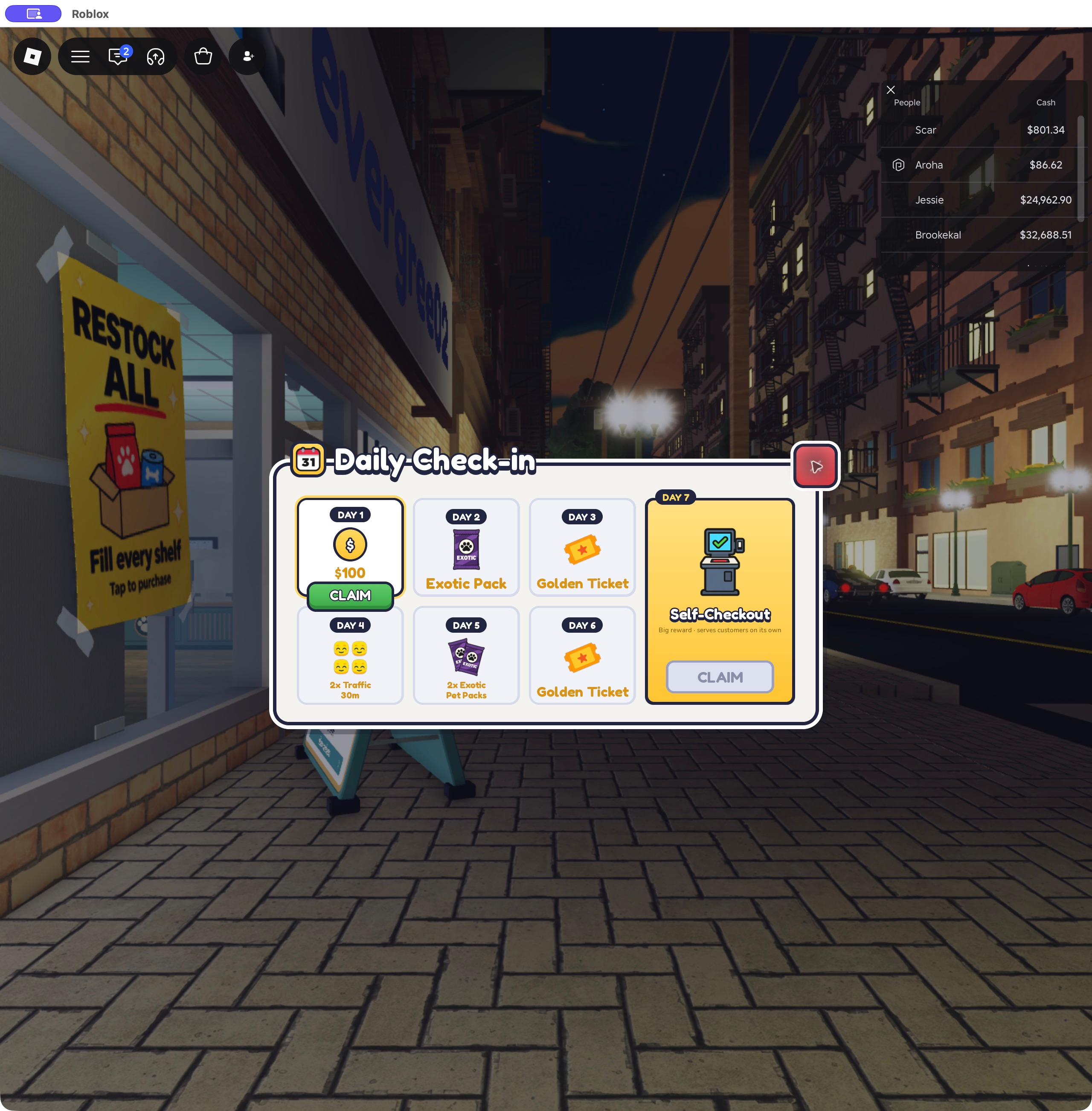
Gameplay screenshots · Game art: Already Arrived Studios / Roblox ↗
Step 7: Spend your first cash
Prices below are the values captured in game. Our suggested order is to keep enough cash for the next stock order first, then add help or new pets. This is a recommendation, not a tested fastest route.
| Purchase | Price | What you get |
|---|---|---|
| Stock order | Shown in the Stock cart | Goods to sell; one capture showed Fish Flakes x9 at $26.42 |
| Fish Pet Pack | $100 game cash | Random fish, using the rarity odds shown on the pack |
| Pet Keeper | $5,000 game cash | Feeds and cares for pets; not floor messes. Level 5 uses Robux |
| Birds / Cats / Dogs Pet Pack | $250 / $400 / $500 | Available after each category unlocks |
| Ocean Wing | $150,000 game cash or 499 Robux | Marine Life area; its pack costs $5,000 |
Step 8: Aim for your next animal unlock
New animal categories unlock as you level up; levels below are from the official Discord FAQ. Fish is available from the start. Store expansions also open every few levels, starting with the $300 Window Nook at Level 2.
| Category | Unlock |
|---|---|
| Pocket Pets | Level 6 |
| Birds | Level 12 |
| Marine Life | Level 14 + 5th store expansion; Ocean Wing $150,000 or 499 Robux |
| Cats | Level 18 |
| Dogs | Level 24 |
| Reptiles | Level 30 |
Controls on PC, phone and console
“Not verified” means we have no capture for that device yet; use the on-screen buttons.
| Action | PC | Phone | Console |
|---|---|---|---|
| Open Phone (Codes, Co-op) | C, or the phone icon on the left | Not verified | Not verified |
| Open Stock | F, or the goods icon | Not verified | Not verified |
| Pick up and pack a shelf, tank or counter | Q to pick up, E to box | Pick up, then pack | Triangle/Y, hold to box |
| Throw away a packed item | Drag it to the outside dumpster, press E | Drag it into the bin outside | Drag it to the bin, press Triangle/Y |
Common questions
Do I need Robux to get started?
No purchase is required for the steps above. Codes, the Day 7 Self-Checkout and the $5,000 Pet Keeper use no Robux. Cashiers, Stockers and paid boosts are Robux purchases; see the staff guide.
Can I play with friends?
Yes. Open Phone → Co-op to start or join a store with up to 8 players. Saves and progress rules are in the multiplayer guide.
Can I play on a phone?
The developer lists desktop, mobile, console and tablet support. We have only tested the desktop controls; on other devices use the on-screen buttons.
Sources & review notes
Official-channel text supplied by site owner; reviewed October 13, 2026; original message link and date unavailable; not a gameplay test
Official game description
Official developer announcement; reviewed October 10, 2026
Official-channel text supplied by site owner; reviewed October 12, 2026; original message link unavailable; not a gameplay test
Direct player confirmation of a working code, recorded in our reward notes; reward details not supplied
Third-party walkthrough for Place 118845698633260; reviewed October 10, 2026; route not independently tested
Third-party procedure, reviewed October 10, 2026; collection and shelf placement not independently tested
Player report; reward listing cross-checked against the in-game Daily Check-in screen
Direct player screenshot; visible interface evidence, not measured performance
Direct in-game interface evidence; no controlled drop-rate or purchase test
How we checked this page
Reviewed October 12, 2026 for Already Arrived Studios, Place 118845698633260. This guide links together facts recorded on the linked pages; each keeps its own source. Code results, the C and F shortcuts, the Stock menu, box pickup and the Daily Check-in listing come from player desktop screenshots and a recording on October 10, 2026. The starting-tank route is from third-party walkthroughs. Cash hiring, nonconsecutive check-in, Golden Ticket rules and fixture controls come from the official FAQ transcript supplied on October 12; phone and console fixture controls are FAQ text, not our test. Unlock levels come from the October 10 catalogue screenshot; Ocean Wing, Pet Keeper and pack prices from October 12 player screenshots. We have not recorded a complete first session, so this is an assembled walkthrough rather than a timed run.
This page covers the Already Arrived Studios game unless a section explicitly identifies the legacy experience. Check your version ↗